We’ve added some powerful new tools to help you stay safe, track more detail, and manage your farm more efficiently.
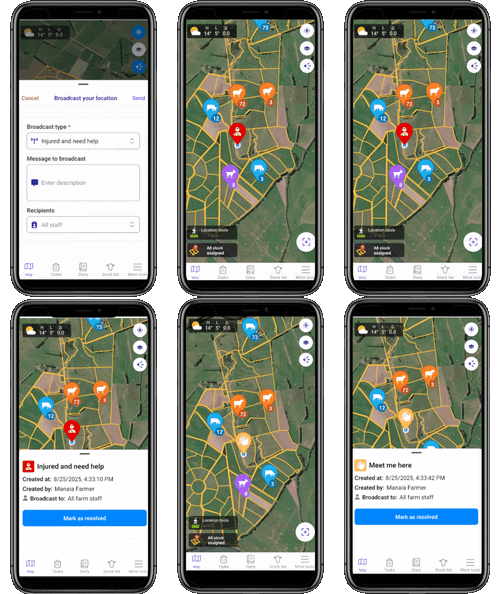
Broadcast your location
Great for emergencies or just coordinating where to meet
Use your phone’s GPS to drop a pin and send your location to other FarmIQ users
Add a short message, or use one of the quick pre-set options like Need help, Vehicle stuck, Out of fuel, or Water leak
Urgent broadcasts display in red, non-urgent in orange, and all notifications are sent directly to staff
Markers expire after 3 days or can be cleared manually
How to use it:
From the top right of the map, tap Broadcast your location > Broadcast type > enter a message tick which staff will receive the message.
Spot spraying on mobile
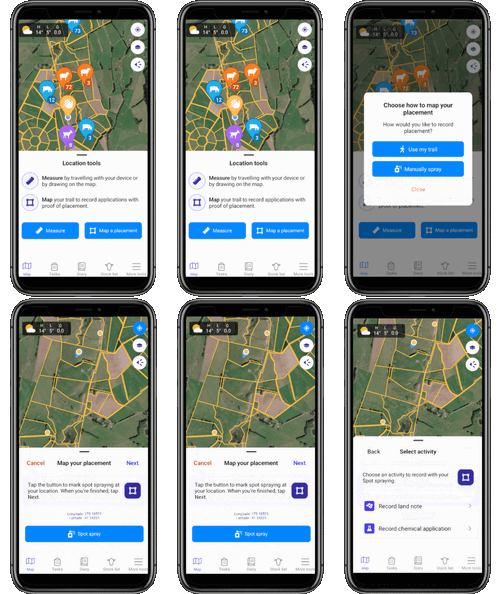
Record more detail and track exactly how much product you’ve applied during each spot spraying session.
Use the mobile app’s GPS to record a spot spraying session.
Map your placement or manually spray
Record it as a land note or chemical application, and view your spots later in the diary and minimap.
Tasks improvements for mobile
Managing tasks is now smoother and more flexible.
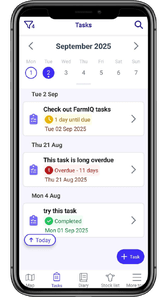
Tasks now display like the Diary, so you can see them by date instead of being limited to one day at a time.
Use filters to quickly hide or show just the tasks you need.
Tap the magnifying glass icon to search for tasks by keyword.
Clearer visibility of overdue, due today, and completed tasks.
Other enhancements
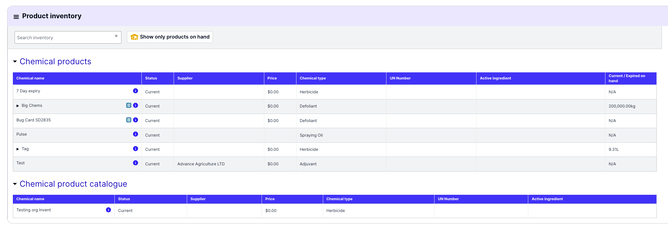
Product inventory: Web now shows “on hand” product stock consistently with mobile. You can also filter for valid, non-expired products only.
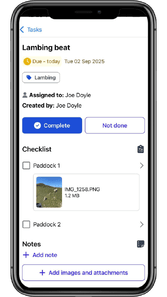
Checklists: Add checklist item attachments
Notifications: All types are on by default (you can turn off any you don’t need).
Rainfall: Export your rainfall records
Land Schedule report: Export to Excel for easy reporting.