Grazing stock
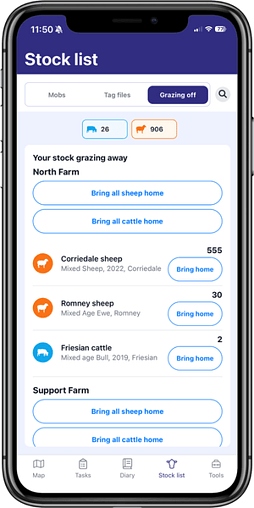
See stock you've got off farm with a grazier in your stocklist, including the mob name, breed, age and number of animals
When stock that you own have finished with the grazier, you can add them back into your FarmIQ farm
When bringing them back, you can enter details such as date, time and weight, add them to a paddock, and add them to a new or existing mob
The new grazing stock feature are available in all FarmIQ packs.
Flexi-stock grazing days report 💻
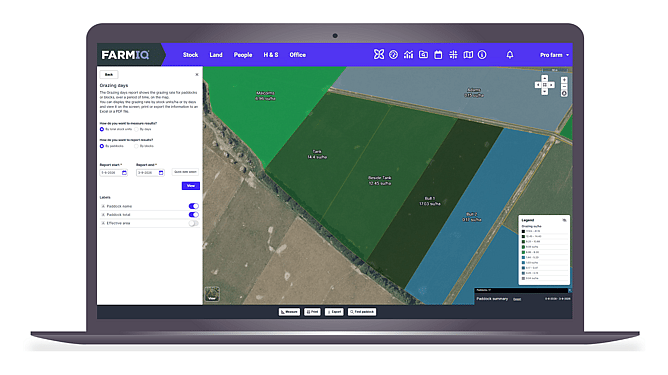
Love the current grazing days report but prefer to use Flexi-stock as opposed to a full stock rec? Good news – we've got a brand-new Flexi-stock grazing days report!
See the grazing rate for paddocks or blocks straight on the map
Customise the date range, selecting the specific period you want to report on
Choose whether the report is measured by days or total stock units
The new Flexi-stock grazing days report is available in the FarmIQ Essentials, Performance+ and Pro packs.
Supplementary feed 📱
You can now feed out from your phone, whilst doing the activity on farm
Select mob to record the feed event against a specific mob
Select from inventory to record a 'feed out' event, but not link it to a specific mob
You can edit feed amounts in the Feed Inventory on your mobile or add new products
The new supplementary feed capability is available in the FarmIQ Performance+ and Pro packs.
Paddock history 📱💻
On web you can view paddock history from the report centre and add paddock history as a favourite report
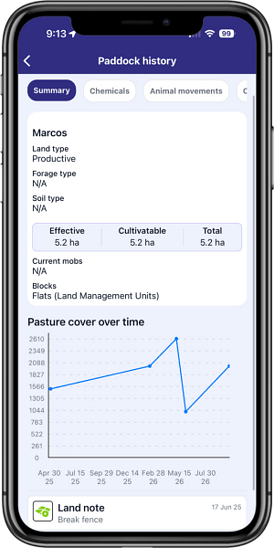
On mobile you can view the last two years of paddock history, including land, forage and soil type, area, chemical applications, animal movements and more
See pasture cover over time for a specific paddock as a simple line graph
View paddock history in the FarmIQ Essentials, Performance+ and Pro packs.
Closing paddocks 📱💻
Close any paddocks that are not being grazed or that you are going to be growing supplements or silage in
Any covers for paddocks that have been closed for grazing will not count toward the cover average and will be in grey
Easily make paddocks available again when they can be put back in the grazing rotation
Ensure your feed budget and feed wedge are accurate for stock and pasture planning
The closing paddocks capability is available in the FarmIQ Essentials, Performance+ and Pro packs.
Task filters 📱
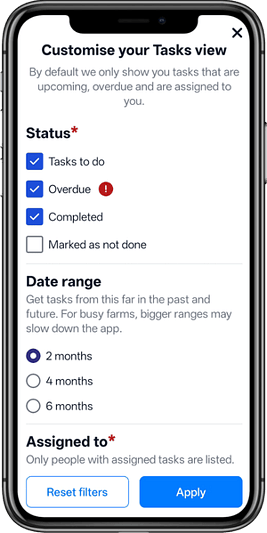
Change date filters when searching for tasks on the mobile app.
Instead of having the default of showing two months in the past and future, you can change the date filter to show up to six months.
You’ll be able to see a more robust history of animal health treatments, mating details, fence maintenance or anything else you need to find.
Looking forward six months, you can check what tasks have been scheduled for the next two seasons.
The new task and diary filters are available in all FarmIQ packs.
Diary filters 📱
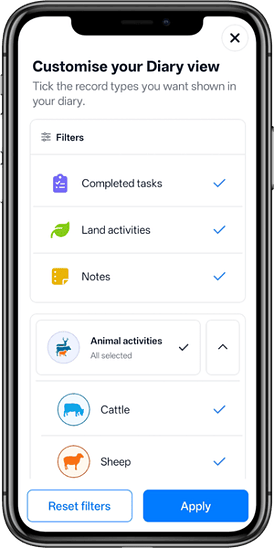
More filters have been added to the diary, so you can customise what items you want to see or hide.
This is particularly handy if your diary is crammed full of tasks and you would rather not see the tasks that have been completed – easily choose to turn those ones off.
As for animal activities, if you’ve got different types of stock but only want to see the items relating to goats – you can simply deselect all the other animals.
The new task and diary filters are available in all FarmIQ packs.
Merge and delete paddocks 📱
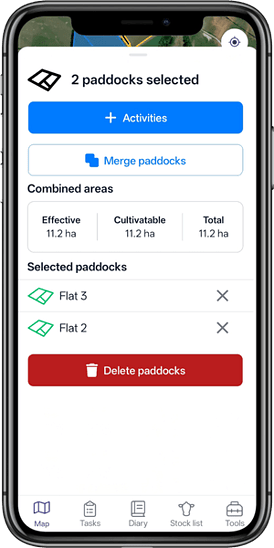
The mobile map now has all the features of the web map thanks to the new capability of merging multiple paddocks and deleting paddocks!
Want to combine two or more smaller paddocks to save on fence maintenance costs or to simplify stock management? Select paddocks that are side by side and click the new blue Merge Paddocks button to create one larger area.
If you need to delete a paddock – perhaps you sold some land or are no longer leasing a block – you can simply click on the paddock and scroll down to the red Delete paddock button. (Note: this will completely remove the paddock from your farm.)
The ability to merge and delete paddocks is available in all FarmIQ packs.